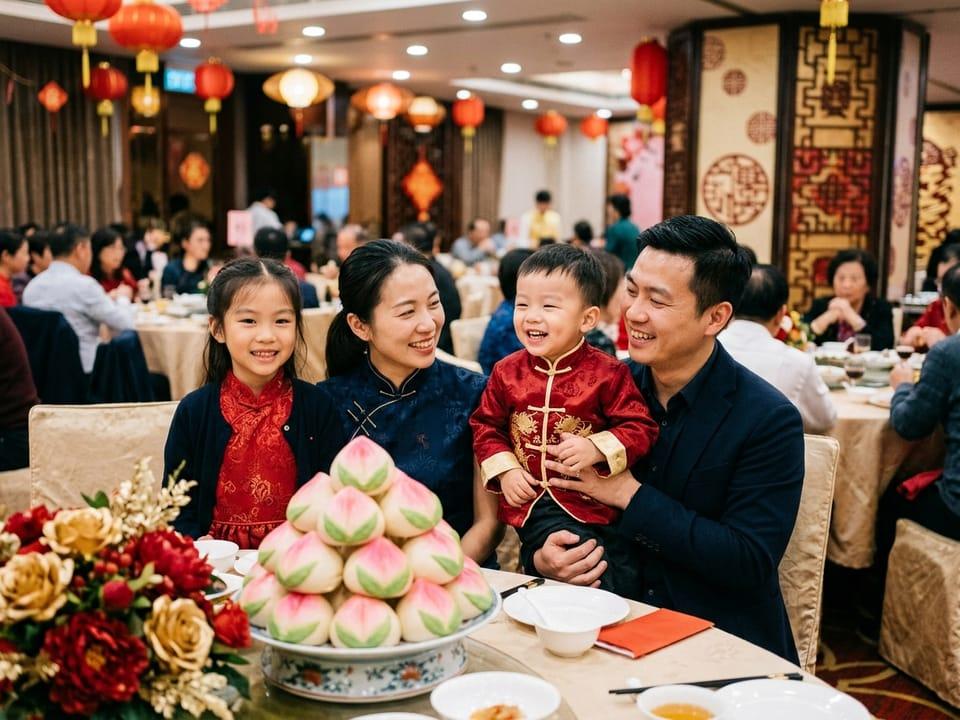
A slideshow for a shouyan (寿宴, a Chinese longevity birthday banquet) needs only three to five minutes and forty or fifty photos. You can copy the prints with a phone and put them together in a phone editing app, and the result holds up on a banquet hall screen. The only part worth paying a professional for is restoring the few prints that are torn, moldy or badly faded. What you do need is time: finding, copying and ordering the photos takes two or three weekends.
Why outsourcing costs so much: every step is billed
Hand a box of old photos to a shop and the bill usually combines several items: scanning or copying, restoration (the worse the damage, the more work), colorizing, and editing with music and captions. Prices vary so much by shop and by print that the only way to know is to bring the photos and ask. When you do, ask four things: is it per print or per package, is colorizing extra, what resolution are the files you get back, and do you also get the raw scans.
Of those steps, copying and editing are the easiest to do yourself and restoration is the hardest. The sensible split is to copy and edit most of the photos yourself and send out only the worst few.
Do the arithmetic first. At five seconds a photo, a four-minute video fits about 48. A family box often holds hundreds, so the real work is choosing. Sort by decade and take five to eight from each; make sure every branch of the family (each fang, 房) has at least two or three; add one or two from the places where the honoree worked and lived when young. The copies you don't use can go to each branch after the banquet as a family record.
Copying with a phone starts with killing the glare
Photo paper and the plastic sleeves of old albums both reflect light, so the copy lives or dies on lighting. Work by a window in daytime with light coming from the side, and switch off the ceiling lights and the flash. Lay the print flat on a dark, matte cloth, hold the phone directly above and parallel to it, step back a little and use 2x zoom so the edges don't distort. If a white streak appears, change the angle and shoot again.
Protect the prints too. The Library of Congress advises handling photographs with clean hands or clean nitrile gloves, holding them by the edges and not touching the image; not using tape, sticky notes or glue on them; and, if you must write on the back, using a soft pencil near the edge. Don't pry prints out of an old album where they've stuck; photograph the whole page. As you go, note the year, place and people in each photo (ask the honoree), and name files by date, such as "1968_wedding," so ordering them later is quick.
Restore what you can yourself, and send out only the worst
Fading, yellowing and dark prints usually come back with the brightness, contrast and color temperature sliders in your phone's photo editor. There are plenty of one-tap restoration apps too. Test one on a print that doesn't matter, then compare the result side by side with the original: has it changed the shape of a face, the eyes, the wrinkles? The honoree and their siblings will notice at once if someone "doesn't look like himself."
Prints that are torn in two, have mold across a face or survive only in half are safer with a specialist. Fixing a digital copy and treating the original are different jobs. For originals with mold, sticking or curling, the Library of Congress says conservation treatment by a photograph conservator may be needed, so don't peel or wash them yourself. Once copied, store the originals somewhere relatively dry (30 to 50 percent relative humidity), cool (about 21°C or below) and stable, with limited light.
Edit in date order and end with the family today
Chronological order is easiest to follow: the honoree's childhood, the wedding, the children's births, each branch setting up its own home, and finally a recent family photo. If you don't have a good recent one, a Spring Festival family photo at home will do. Give each photo four or five seconds, a little longer for group shots, with a one-line caption of year and place. Skip the long title animation and open with the best picture of the honoree as a young adult. For music, choose songs the honoree loves; if you'll post the video online later, use the library built into your editing app or the platform.
Fit the screening into the banquet's running order. The Jingdezhen city gazetteer in Jiangxi records that families there set out an incense table and red candles, the younger generations bow, and the main meal is usually at midday. Customs differ, but playing it after the guests are seated and before the birthday greetings (拜寿, baishou) gives the room a quiet opening. Ask the venue in advance whether there's a screen, whether it takes a USB stick or a laptop and which formats it plays, and test it the day before.
Photo shop, event crew or yourself
|
Photo shop or studio |
Event photographer or wedding crew |
Yourself |
| How the cost works |
Per-print scanning and restoration; editing extra |
Often bundled with filming on the day |
Mostly time |
| Quality |
Consistent scanner quality |
Practiced at pacing an edit |
Depends on avoiding glare |
| Changes |
Revisions may cost extra |
Depends on the contract |
Anytime |
| Best for |
Many photos, much damage |
Combining it with the day's video |
Up to one or two hundred photos |
How to book coverage of the day itself is covered in what a shouyan photographer costs.
Put the missing group photo at the end
Going through the box, families often notice there's no photo with everyone together, or that someone has always lived far away. With pokesta you can make a family portrait with AI from each person's phone photos, everyone in tangzhuang around longevity buns, for $1 per photo, with the first one free. It's a made image rather than a real photo from the past, so if you add it as the closing slide, mark "AI-generated" in a corner. Try it first with a recent photo of the honoree, free for the first one, and add it to the slideshow if you like it.
References