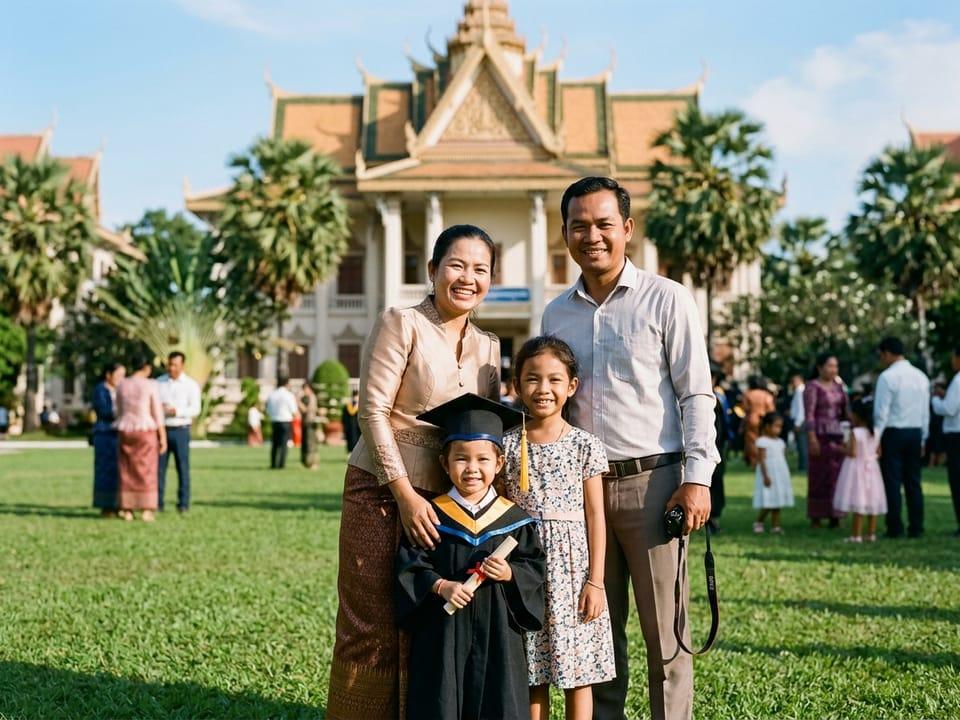
With a phone, a tripod and the right hour, a family can take most of its own graduation photos, including the shot with everyone in it. Shoot in the dry season, in the first hour after sunrise or the last hour before sunset, keep to the shade, use Portrait mode for the graduate on their own and the 10-second timer for the family. The two things that are genuinely hard are harsh midday light and arranging a large family quickly, and those are what a photographer is paid for.
The hour matters more than the phone
Cambodia's dry season runs from early November to March, and the rains last from mid-May to mid-September or early October, so a shoot day between November and March is the safest bet for outdoor photos. Sunrise in Phnom Penh falls between roughly 5:35 and 6:25 a.m. through the year, and sunset between about 5:30 and 6:30 p.m. In late October, for example, the sun rises around 5:51 a.m. and sets around 5:37 p.m. Plan to start shooting soon after sunrise or about an hour before sunset, when the light is low and soft.
At midday the sun is high, so eyes sink into dark shadows and the white of a shirt burns out. If you have to shoot then, move into open shade, under a tree or the edge of a building, with the bright area behind you rather than behind the graduate. When the background is much brighter than the face, the phone can leave the face too dark. On an iPhone, tap the face to set focus and exposure, then drag up or down next to the focus box to brighten or darken. Touch and hold until AE/AF Lock appears to keep that setting for the next few shots. Android phones have similar controls; check your phone maker's help pages.
Portrait mode for the graduate, Photo mode for the family
For a photo of the graduate alone, Portrait mode is the closest a phone gets to a photographer's lens. Apple's guide explains that it keeps the subject sharp while blurring the foreground and background, offers lighting effects such as Natural Light and Studio Light, and has a Depth Control slider to adjust the blur. Natural Light is the safe choice outdoors. If the result looks odd, you can turn the portrait effect off afterwards in the Photos app.
For the whole family in two rows, switch back to the normal Photo mode, so no one in the back row ends up soft. Apple notes that the camera's face detection balances exposure across several faces, which helps when the graduate in a dark gown stands next to parents in white.
A tripod and the 10-second timer put everyone in the picture
The iPhone camera timer offers 3, 5 or 10 seconds. Use 10 for a family photo, so the person who pressed the shutter can walk back calmly instead of running. Mark that person's spot in the line before you start, put the phone at roughly chest height on the tripod and take three or four frames each time in case someone blinks.
Agree on the poses before you go, so you are not deciding in the heat. A few that work: the graduate in the centre holding the diploma case, parents on either side; the graduate handing flowers to a grandparent; a close shot of hands holding the diploma together; everyone looking at the graduate rather than the camera. In Cambodian etiquette, a younger person resting a hand on an elder's shoulder in a photo is considered rude, so keep hands at the side or linked in front when grandparents are in the frame. If the gown has to be rented for the day, our gown rental guide covers what to check.
Choose places you are allowed to use
Your own campus can be the most meaningful backdrop of all, but ask the faculty office first whether photography on campus needs permission. At the Independence Monument, traffic circles the roundabout, so stay on the pavement or the park side and keep the tripod out of the way of walkers. If you plan photos near the Royal Palace, follow the rules posted at the entrance; our guide to the Royal Palace and Silver Pagoda has the opening hours and dress code. Wherever you go, bring water, a towel and a small folding stool for grandparents.
DIY, a photographer or a studio
|
Your own phone |
Location photographer |
Studio |
| How the cost works |
A tripod, travel, perhaps the gown |
Time, locations, retouching |
Session fee, sometimes gown and makeup |
| Heat and family energy |
Stop whenever you like |
Paced by the schedule |
Air-conditioned, no weather |
| Changing the date |
Any day |
Under the written terms |
Under the studio's rules |
| Result |
Real moments, uneven light |
Polished, handles harsh light |
Even light, formal |
| Suits |
Families comfortable with a phone |
Graduates who want many looks |
One formal portrait |
A photographer earns the fee in three situations: when you can only shoot at midday and need someone who can handle hard light, when twenty relatives need arranging fast, and when you want polished shots of the graduate in several places. A practical split is to take the family photos yourselves and pay a studio for one formal portrait of the graduate. For the ceremony day itself, see our Cambodian graduation photos guide.
Before the shoot, try the family portrait on screen
If a relative can't make the shoot day, or you want to see how the family looks together before booking anything, pokesta can turn the phone photos you already have into a graduation family portrait with AI. It is a created image, not a photo from the day, so keep it alongside the real ones. At $1 per photo with your first photo free, try it with a recent photo of the graduate: make a graduation family photo.
References